|
Below is the sample excel data of a multi-line header detail transaction.
Fig. 1
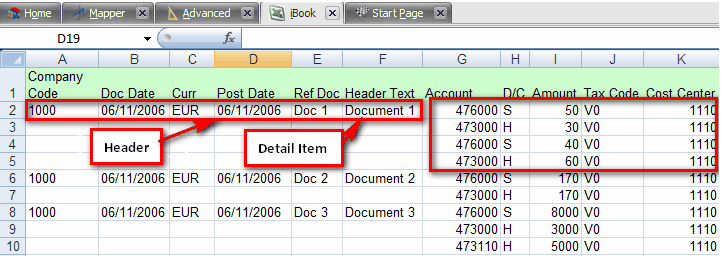
Basically there are 3 types of Block Types for Header-Detail items in a loop.
| A. | "Start Value" = Header line value |
| B. | "Loop Value" = Line item value |
| C. | "Start+Loop value" = Header + Line item value |
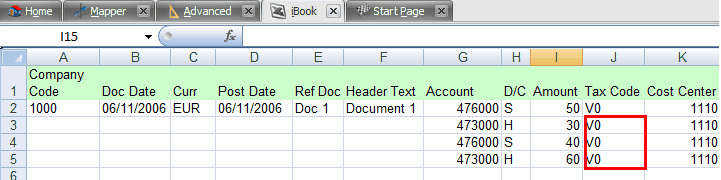
In some rare case you have a field inside the loop that should always take value from header row. In that case, you would map "Start Value" for this field inside the loop. For example, in the above data file (Fig. 1), if we do not want to write “V0” in every detail item. We can write it only once as shown in Fig. 2 & map it as Start Loop (Fig. 3). It will consider “V0” as the block type for all subsequent detail items. (Fig. 4).
Fig. 2
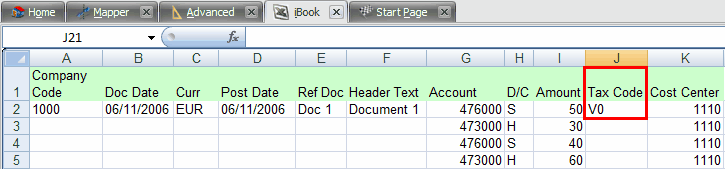
Fig. 3

Fig. 4
|
In some cases, you can have Header is on row 2 and all the line items will be from row 3 as shown in Fig. In that case, you would map only "Loop value" for the fields inside the loop. So if we assign loop value (Fig. 6) for the detail items, Process Runner will pickup the detail items from the second row below the header item.
Fig. 5
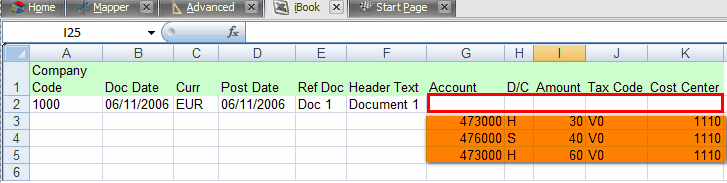
Fig. 6

|
In some cases, you can have Header is on row 2 and all the line items will be from row 3 as shown in Fig. In that case, you would map only "Loop value" for the fields inside the loop. So if we assign loop value (Fig. 6) for the detail items, Process Runner will pickup the detail items from the second row below the header item.
Fig. 5
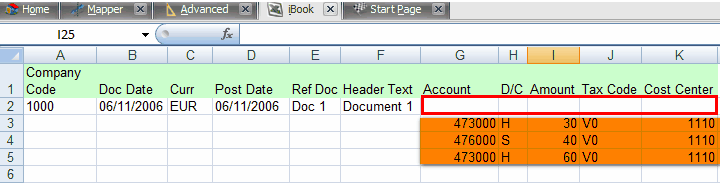
Fig. 6

In some cases, you can have Header is on row 2 and also line starts from row 2. In that case, you would map "Start+Loop value" for the fields inside the loop.
Fig. 7
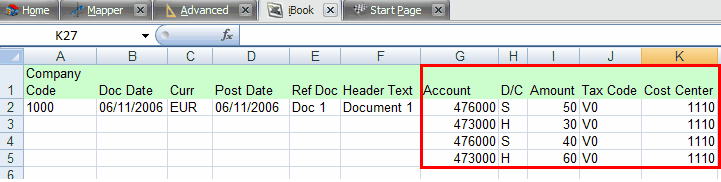
Fig. 8

|
Next:
BAPI/RFM - Basic
|


