Installing License on computers running Process Runner (client side)


Installing License on computers running Process Runner (client side) |
|
|
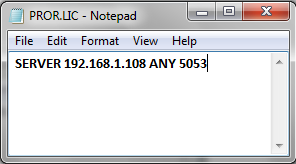
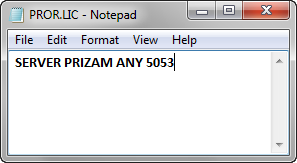
Follow the steps below to create a license file for Process Runner clients so they can connect to License Server from their computer: 1.Note the IP Address or a Server Name where License Server is running. 2.Open notepad and write following: SERVER < IP Address or Server Name > ANY <Port Number> 3.Save this text file on your desktop and name it 'PROR.LIC'.
OR
Note: Word ANY between server name and PORT number is important.
Distribute PROR.LIC file to every user of Process Runner in your company and instruct them to copy this file to My Documents\Innowera\LIC folder. When they start Process Runner , it should connect to the License Server and check out appropriate license.
Notes: 1.License file for Process Runner client needs only Server Name or IP Address and which port to connect. No other information is required in this file. This is one line text file. 2.If there is any problem in checking out the license by Process Runner , an error message will be displayed indicating exact problem when user starts Process Runner. 3.Additionally, each Process Runner client will need a specially created .license file provided by Innowera. Without this special .license file, Process Runner will not attempt to connect to License Server.
|