Stat displays the summary of each of the run process you have executed so far. Each time you execute the run, a record is inserted with summary information. Following information is presented.
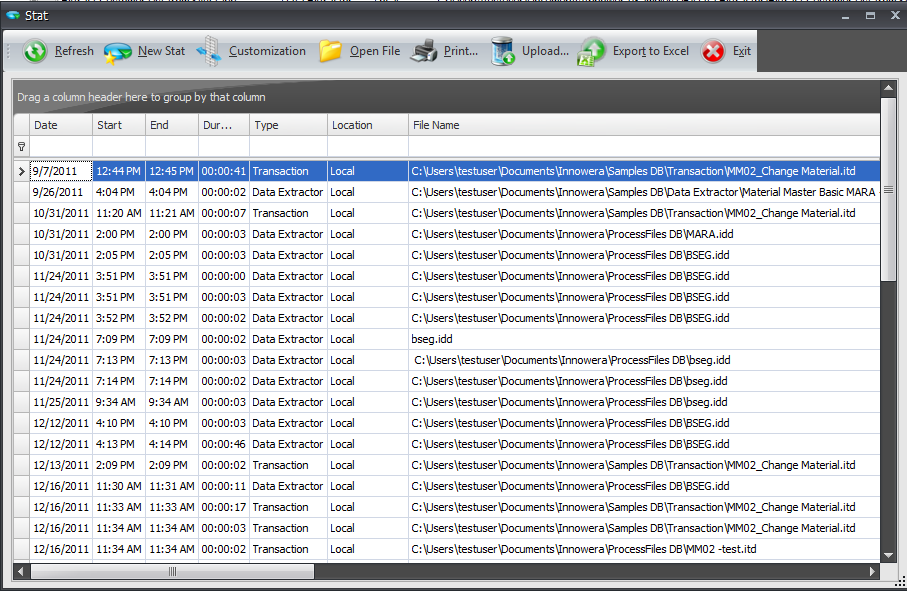
• Date : Date on which file was Executed in Process Runner DB.
• Start time : Time when process started.
• End time : Time when process ended.
• Duration : Total time taken by the process.
• Type of file : Type of the process that was executed i.e Transaction, RFM/BAPI, GUI Scripting etc.
• Location : Path of the process file that was used.
• File Name : Name or EShare server ID of the process file.
• System : SAP Server System ID where execution took place.
• Client : SAP Client that was used.
• User : User Name that was used.
• Function name : Transaction Code or Function Module name (eg. BAPI_Customer_GetDetail2, MM02).
• Total calls : Total number of calls to SAP executed for the entire call session.
• Threads : Number of threads used to execute the file.
Stat Tool Bar:

• Open : Allows to open and view Process Runner DB Stat files. Click here to know more on this.
• Refresh : Refresh current Stat File for latest updates.
• New Stat : Creates a new Stat File, old Stat File will be archived. By default the archived file can be found at '\Documents\Innowera\Other DB'.
• Customization : Add \ Remove Columns as per user's convenience.
• Open Process File : Opens the process file for the selected Stat entry.
• Print : Print entire Stat.
•Upload: This option is used to upload the Process Runner DB Statistics to Innowera Dashboard.
•Export to Excel: This option is used to export the statistics data to Excel file. Click here to know more on this.
• Exit : Exit Stat.
Next: